Table of Contents
In today’s competitive digital landscape, building an engaging and professional online presence is essential for bloggers, content creators, journalists, publishers, editorial teams, online magazines, and media professionals.
A Blog and Editorial Website Webflow Template provides a modern platform to showcase blog posts, editorial articles, lifestyle stories, industry insights, news updates, personal experiences, creative content, and informative publications.
Designed for bloggers, writers, and digital publishers, this template combines an elegant visual appearance with intuitive navigation and practical website sections.
It helps you present your author profile, featured articles, blog categories, latest posts, trending stories, editorial collections, reader testimonials, newsletters, FAQs, and contact details in an organized way. These features help visitors discover engaging content, explore different topics, connect with your writing style, stay updated with fresh publications, and interact with your editorial platform effortlessly.
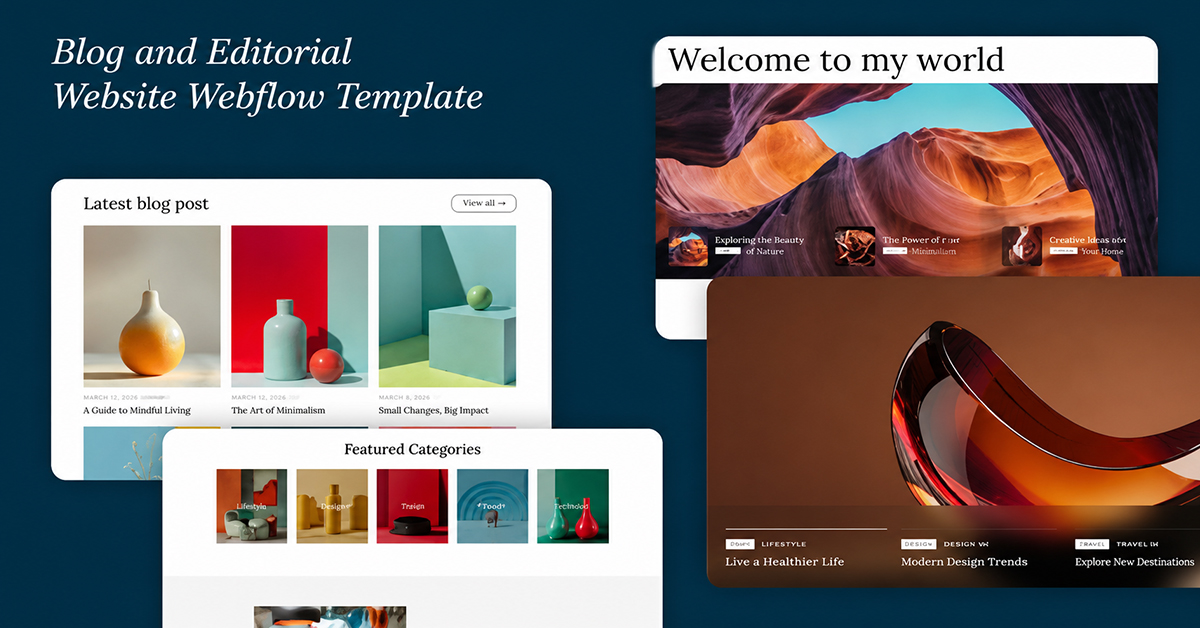
Blog and Editorial Website Webflow Template
The Blog and Editorial Website Webflow Template offers stylish features to showcase articles, publish engaging content, highlight editorial stories, and attract more readers.
Key Features are:
- SEO Optimized
- Seamless CMS Integration
- Newsletter Signup
- Modern & Minimal Design
- Multiple Blog Layouts
- Rich Media Support
- Responsive & Mobile-Friendly
- Featured Categories Section
- Popular Blogs Showcase
- Author Profiles
The Blog and Editorial Website Webflow Template features a fully responsive layout, customizable sections, engaging blog showcases, editorial content highlights, author profiles, featured articles, category layouts, newsletter subscriptions, contact forms, and clear call-to-action elements.
Whether you publish lifestyle blogs, business articles, technology news, travel stories, fashion updates, educational content, personal experiences, industry insights, or digital publications, this template offers a professional foundation to showcase your content, promote your stories, and attract potential readers.
With flexible customization options, you can personalize article descriptions, blog categories, author profiles, brand colors, typography, images, featured posts, and promotional sections to match your publication’s identity without requiring advanced technical skills.
Its responsive design ensures your website looks professional across desktops, tablets, and mobile devices, helping visitors explore your articles, discover different topics, read editorial stories, review author information, and connect with your team effortlessly.
You can also publish valuable content about industry trends, lifestyle tips, business insights, technology updates, travel experiences, creative ideas, and educational topics to demonstrate your expertise and engage your target audience.
Featuring an elegant design and user-friendly navigation, this template helps bloggers, publishers, and editorial professionals build credibility, showcase their creativity, grow readership, generate subscriptions, strengthen audience relationships, and support long-term digital growth.
1.Inkpost-Blog and Editorial Website Webflow Template

Building a professional online presence is simple with the Inkpost Blog and Editorial Website Webflow Template, designed for bloggers, content creators, journalists, publishers, editorial teams, online magazines, writers, digital media agencies, and businesses sharing informative content.
It features modern layouts, flexible customization options, an SEO-friendly structure, and responsive design to deliver a professional and engaging browsing experience across desktops, tablets, and smartphones.
The Inkpost template combines clean visuals, modern typography, intuitive navigation, and thoughtfully organized sections to showcase blog posts, editorial articles, featured stories, lifestyle content, industry insights, news updates, and creative publications effectively.
This premium Webflow template helps bloggers and digital publishers establish credibility through professionally designed blog pages, author profiles, article categories, featured content sections, reader testimonials, newsletter subscriptions, FAQs, and contact forms.
With Webflow’s visual editing tools, you can customize colors, typography, images, layouts, article descriptions, and branding elements to reflect your publication’s identity and content objectives without requiring advanced coding skills.
Its flexible structure allows you to present lifestyle blogs, business articles, technology news, travel stories, fashion updates, educational resources, personal experiences, and editorial content in a clear and organized format.
The responsive layouts and seamless navigation help visitors explore your articles, discover interesting topics, read featured stories, learn about authors, and connect with your editorial team across different devices.
Created for modern bloggers and digital publishing professionals, the Inkpost Blog and Editorial Webflow Template combines professional aesthetics, practical functionality, and customization flexibility to strengthen brand recognition, showcase creative content, attract readers, generate newsletter subscriptions, and support sustainable digital growth.
Frequently Asked Questions
Is Inkpost suitable for personal blogs?
Yes, Inkpost is ideal for personal blogs, lifestyle stories, and creative writing.
Can I use Inkpost for an online magazine?
Yes, it works perfectly for digital magazines, news portals, and editorial websites.
Is Inkpost responsive on mobile devices?
Yes, Inkpost offers a responsive design for desktops, tablets, and smartphones.
Can I customize the Inkpost Webflow Template?
Yes, you can easily customize layouts, colors, fonts, images, and content.
Does Inkpost support different blog categories?
Yes, you can organize articles into multiple categories for easier navigation.
Is Inkpost beginner-friendly?
Yes, its user-friendly Webflow structure makes website customization simple for beginners.